
Preferences
Orsane can write dates the way you’re used to reading them. Open Settings → Preferences to change three things:
- Date notation: how dates are written.
- Time notation: a 12-hour or a 24-hour clock.
- Start of the week: the day your week begins.
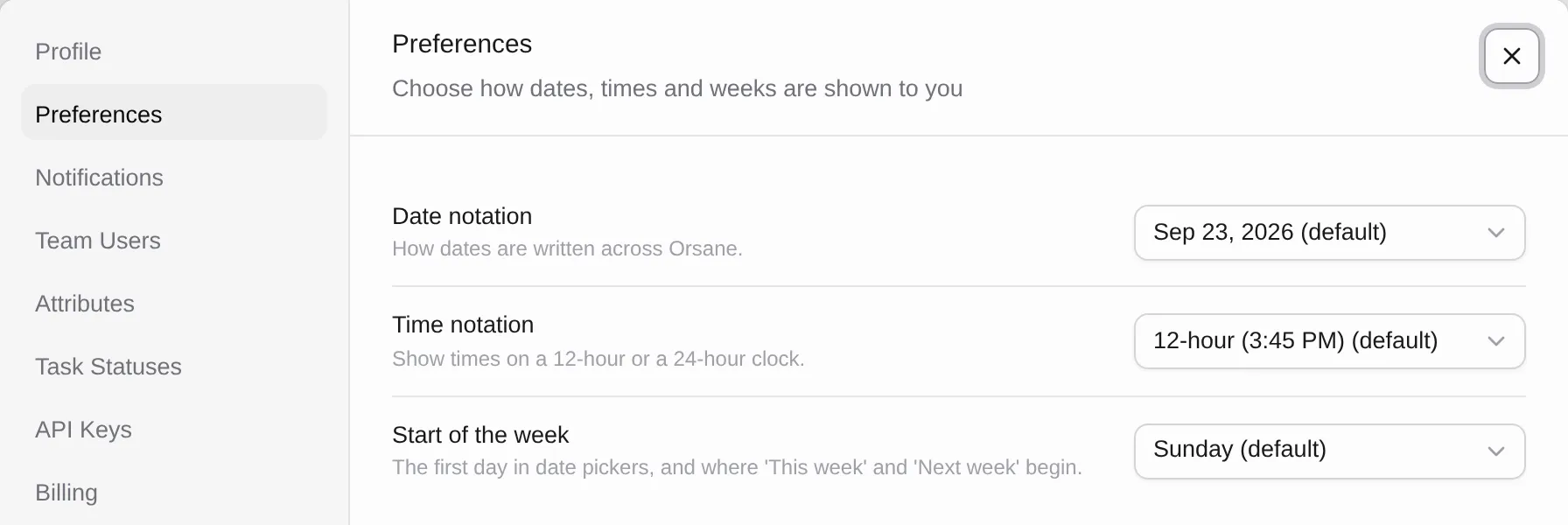
Changes apply as soon as you pick an option. There is nothing to save and no need to reload.
Preferences are personal. They belong to your account, not to a team, so they
follow you into every team you’re a member of. Your teammates keep their own
settings. If you switch to 23/09/2026, a teammate who reads Sep 23, 2026 still
sees Sep 23, 2026.
Date notation
Section titled “Date notation”| Option | Example | Short form |
|---|---|---|
| Default | Sep 23, 2026 | Sep 23 |
| Day first | 23 Sep 2026 | 23 Sep |
| US numeric | 09/23/2026 | 09/23 |
| European | 23/09/2026 | 23/09 |
| Dotted | 23.09.2026 | 23.09. |
| ISO 8601 | 2026-09-23 | 09-23 |
The dropdown shows each option with today’s date, so you can see what you’re picking.
The date notation is used everywhere Orsane shows you a date: the Due and Created columns, the task detail panel, the activity feed, date filters, API key expiry dates and billing dates. Where space is tight, such as time entries in the timer panel and older notifications in the Inbox, Orsane uses the short form, which drops the year.
Time notation
Section titled “Time notation”Pick 12-hour (3:45 PM) or 24-hour (15:45). Timestamps use this setting,
for example when you hover over a comment or an activity entry to see exactly when
it happened.
Start of the week
Section titled “Start of the week”Choose Sunday, Monday or Saturday. This day is used in three places:
- Date pickers: every calendar in Orsane starts its rows on this day.
- Week groupings: when a list is grouped by Due, the day your week starts decides which tasks go under This week and which go under Next week. When a list is grouped by Created, it decides where This week begins.
- Adding a task inside a group: if you add a task under This week or Next week, its due date is set to the last day of that week.
Defaults
Section titled “Defaults”Everyone starts with Sep 23, 2026 dates, 12-hour times and Sunday as the first
day of the week. Accounts that existed before preferences were introduced got the
same defaults.